
I did not sit down one morning and decide that the world needed another provider manager. I just wanted Codex to stop making me choose between my remaining quota and my Chat history.
When my official Codex quota was running low, I sometimes wanted to route requests through a compatible third-party provider for a while. The switching itself was not difficult. Editing a TOML file is hardly a major engineering problem. The annoying part was what happened around the switch: old conversations could suddenly look as if they had disappeared.
That was the small irritation that became Codex Provider Switcher.
CC Switch was useful, but it was not quite my tool
CC Switch was the obvious project to look at first. It is a serious all-in-one manager. It handles multiple coding agents, many provider presets, MCP servers, skills, cloud sync, proxy features, usage tracking, and more. For someone managing a whole collection of AI tools across several machines, that scope makes sense.
It just did not feel like the thing I wanted to open for this particular problem.
My requirement was much narrower: one Windows machine, one Codex installation, one existing ChatGPT login, one optional third-party route, and one continuous history. I wanted a small native utility that understood Codex’s specific configuration and could tell me exactly what it was about to change.
The problem was not that CC Switch could not do enough. It was that I did not need enough of it.
The real problem was the provider identity
Codex records a model_provider value with its threads. If the official route uses one provider ID and a third-party configuration introduces another, the old threads are not necessarily deleted. They can simply end up outside the history partition that the current view is using.
From the user’s side, that distinction is not comforting. The sidebar is empty, so the conversations feel gone.
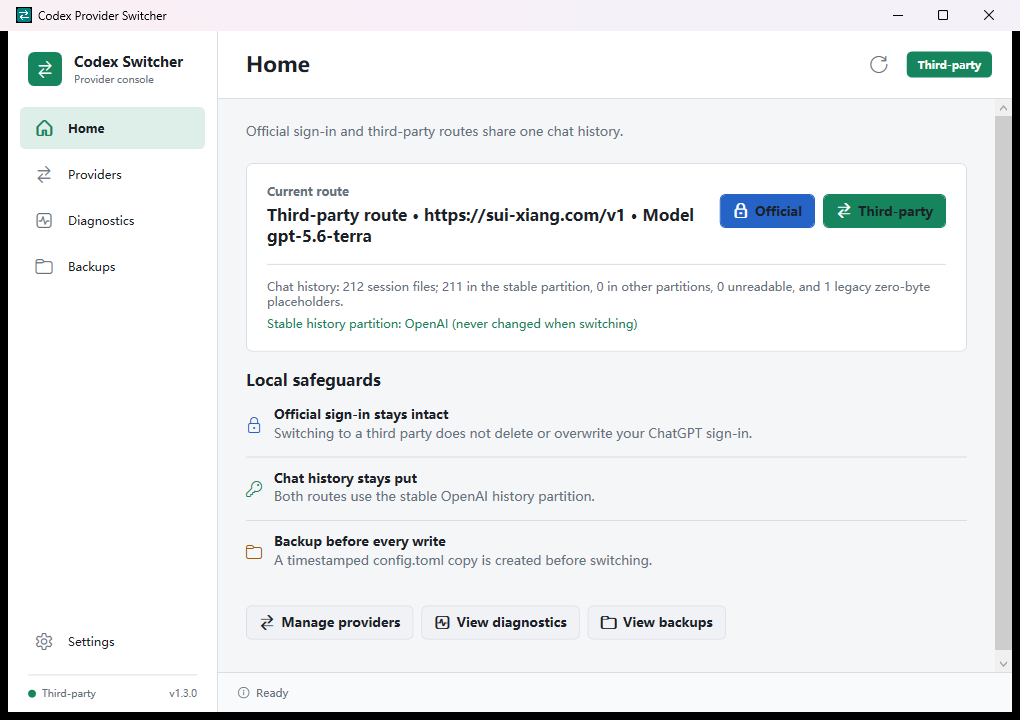
The design that finally made sense was to keep one stable provider identity, OpenAI, for both routes. Switching modes changes the backend details under that identity, but it does not move Codex into another history bucket. The official auth.json stays untouched, so returning to the official route does not mean signing in again.
Version 1.0 was supposed to be the whole project
The first version was deliberately boring. I used WPF because I wanted a real Windows application, not a Python script with a window attached to it. It could switch between the official login and a Responses API-compatible endpoint, create a timestamped backup of config.toml, and optionally restart Codex afterward.
The third-party API key goes into Windows Credential Manager. It is not written into config.toml, the source tree, or a log file. A tiny local token broker gives Codex the key only when the third-party route needs it.
I also did not want a green “connected” message based on a shallow HTTP check. Before switching, the app sends a real request to /v1/responses and verifies authentication, SSE streaming, a complete response event, and usable text output. A provider can call itself OpenAI-compatible, but Codex needs more than a familiar URL.
At that point I thought the project was done.
Then “compatible” turned into a much bigger question
A text response is only the first layer of Codex. Plugins need function calls and tool results. Image generation uses another endpoint. Remote depends on the official desktop host and account state. A route can pass a simple prompt while still failing the features that make Codex useful.
So version 1.1 grew a diagnostics page. The tool-call check is a two-request round trip: the provider must return a function call, then accept the tool output and finish the response. The image check makes an actual /v1/images/generations request, decodes the result, checks its file signature, and saves the verified image locally. The host checks also show whether the official app still reports Apps, plugins, Remote, and image features as available.
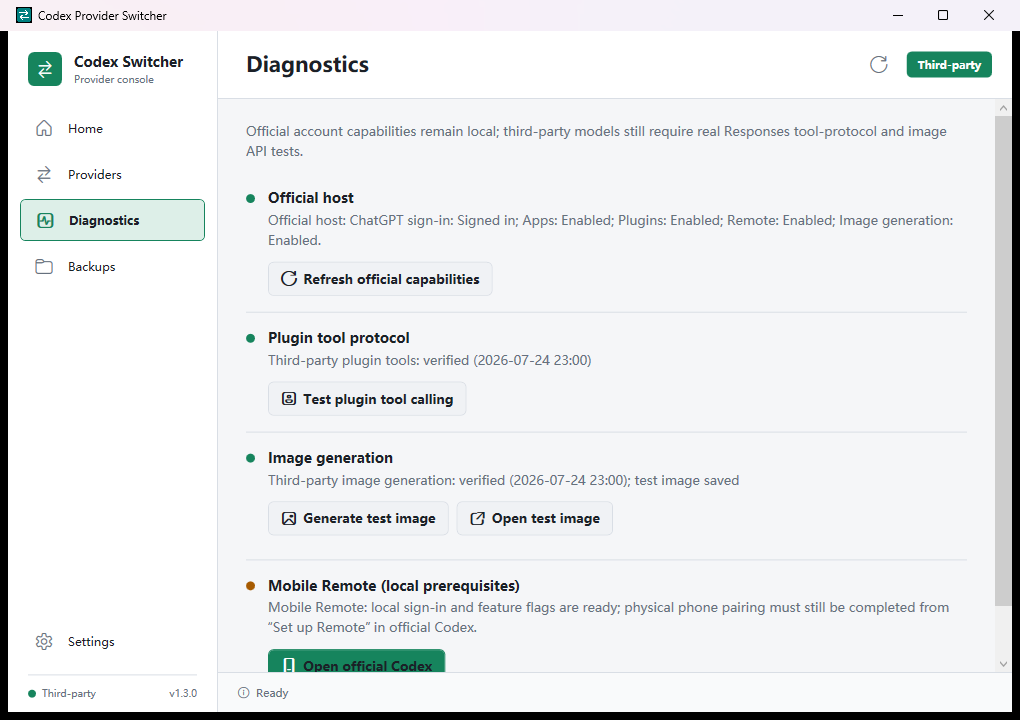
There is an important limit here: the switcher can verify the local prerequisites for Mobile Remote, but it cannot pair a phone by itself. That still belongs in the official Codex apps. I would rather show that boundary than put a reassuring check mark on something the utility did not actually complete.
The little utility kept asking for a better interface
Version 1.2 added Chinese and English. That was less about decoration and more about diagnostics. Connection failures, privacy warnings, and configuration states are easier to trust when they are written in the language I am thinking in.
Version 1.3 reorganized everything into five pages: Home, Providers, Diagnostics, Backups, and Settings. It added light, dark, and system themes, a proper backup browser, and a compact navigation mode for smaller windows. None of that changed the switching model. It just stopped the interface from feeling like a pile of controls that had accumulated during testing.
This was the funny part of the project. I started it because another tool felt larger than my problem, and then my own tiny utility began growing pages. The difference, at least for me, is that every page still points back to the same narrow job: switch one Codex installation without disturbing its history or official login.
The parts I do not want the app to hide
Using a third-party provider means that provider receives the prompts and files sent through it. The endpoint has to support the OpenAI Responses API and SSE correctly. Individual plugins may still require their own OAuth connection and permissions. The current Windows release is unsigned, so SmartScreen may warn before launch.
Those are not footnotes to bury under a download button. They are part of the decision to switch.
That is also why I do not think of Codex Provider Switcher as a universal replacement for CC Switch. CC Switch has a much broader job and may be the better choice if you manage several agents, providers, and machines. Mine is intentionally opinionated. It is for the exact moment when official quota is running out, another route is available, and I do not want my Codex workspace to feel like it has forgotten me.
Most of my small tools begin this way. Something interrupts my work often enough that I finally stop tolerating it. Then I spend much longer building the fix than I ever spent on the original annoyance.
At least now I can switch back and forth without wondering where yesterday’s conversations went.
Project: github.com/tuolaji996/codex-provider-switcher
Latest release: Codex Provider Switcher v1.3.0
Windows download: CodexProviderSwitcher-v1.3.0-win-x64.zip