
When I first set up SSH key login from a Windows PC to a Debian server, I thought I was doing a five-minute job. Generate a key. Copy one public-key line into authorized_keys. Decide whether root and password login should stay enabled. Restart SSH.
That list is short only when every command is already in muscle memory. In the real workflow, Windows paths meet shell quoting, an SSH port is put in the wrong place, a public-key file is missing, or a configuration change is applied before there is a verified way back in. None of those are difficult concepts. They are just the sort of small, high-consequence details that make a basic server task feel more fragile than it should.
That frustration became SSH Key Deployer, a small Windows desktop tool for setting up an independent Ed25519 key on a Debian server without turning the first deployment into a copy-and-paste exercise.
I did not want to build another SSH client
Windows already has good SSH tools. PowerShell, Windows Terminal, and OpenSSH are perfectly capable when I need a normal shell. I did not want a terminal emulator with a few extra buttons.
I wanted something narrower: a guided first-login workflow that understands the order of operations. It should generate a pair of files, connect using an existing account and password, put the public key in the right place, apply the chosen login policy, check the server configuration, and prove that the new key can actually log in before calling the job finished.
That last part is the difference between automation that saves time and automation that just moves the risk around. A key file existing on Windows does not mean the server accepts it. A server accepting a key does not mean an SSH configuration change is valid. And a configuration file looking correct does not guarantee that the effective policy is what I intended.
The key pair should be a real, independent file pair
One of the first requirements was simple: the user should choose a location and receive two normal files, a private key and its matching .pub file. There is no hidden application database, no key stored in a browser profile, and no need to search through a temporary folder after deployment.
SSH Key Deployer uses the Windows OpenSSH tooling to create an Ed25519 pair, then restricts the private-key ACL so that it is not left broadly readable on the local machine. The public key is still just a standard OpenSSH public key. That matters because the result should remain useful outside the app: it can be inspected, backed up, and used with normal SSH commands later.
The password used for the initial connection is deliberately not part of that saved state. It is used for the current deployment session and is not written into a configuration file or a log. The tool needs a password to bootstrap a key login; it does not need to remember one.
Server identity cannot be a silent detail
It is tempting to treat the first SSH connection as a technicality. A script can simply accept whatever host key it sees and keep moving. That makes the happy path smoother, but it removes the one moment when the operator can notice that they are talking to the wrong server.
Instead, the app shows the server host-key fingerprint and asks for an explicit decision. The fingerprint still needs to be checked through an independent channel, such as a provider console. A desktop app cannot prove a remote server’s identity by itself, and it should not pretend that it can.
Changing SSH policy needs more than editing a text file
The app lets me make the two decisions that usually start the most nervous conversations: should root login be allowed, and should password authentication remain available? Those are legitimate choices, but they should not be applied by casually rewriting a server’s main configuration file.
For that reason, the deployment writes a small managed SSH configuration drop-in, validates the configuration with sshd -t, checks the effective configuration with sshd -T, then reloads SSH and tries the new key-based login. The policy is not considered complete just because a file was copied successfully.
I also wanted the tool to be cautious about failure. Before changing authorized_keys or the managed policy, it records the state it needs for recovery. If a later step fails, it attempts to restore the affected state. It also avoids blindly replacing an authorized_keys file if another administrator changed it at the same time. In that situation, a clear conflict is much better than quietly deleting someone else’s key.
This is not a promise that someone should close their provider console and trust a progress bar. The practical rule is still to keep an existing console or SSH session open until the final key-login check passes. The application is there to make the safe sequence easier to follow, not to make server recovery disappear as a responsibility.
A small interface can make the important choices visible
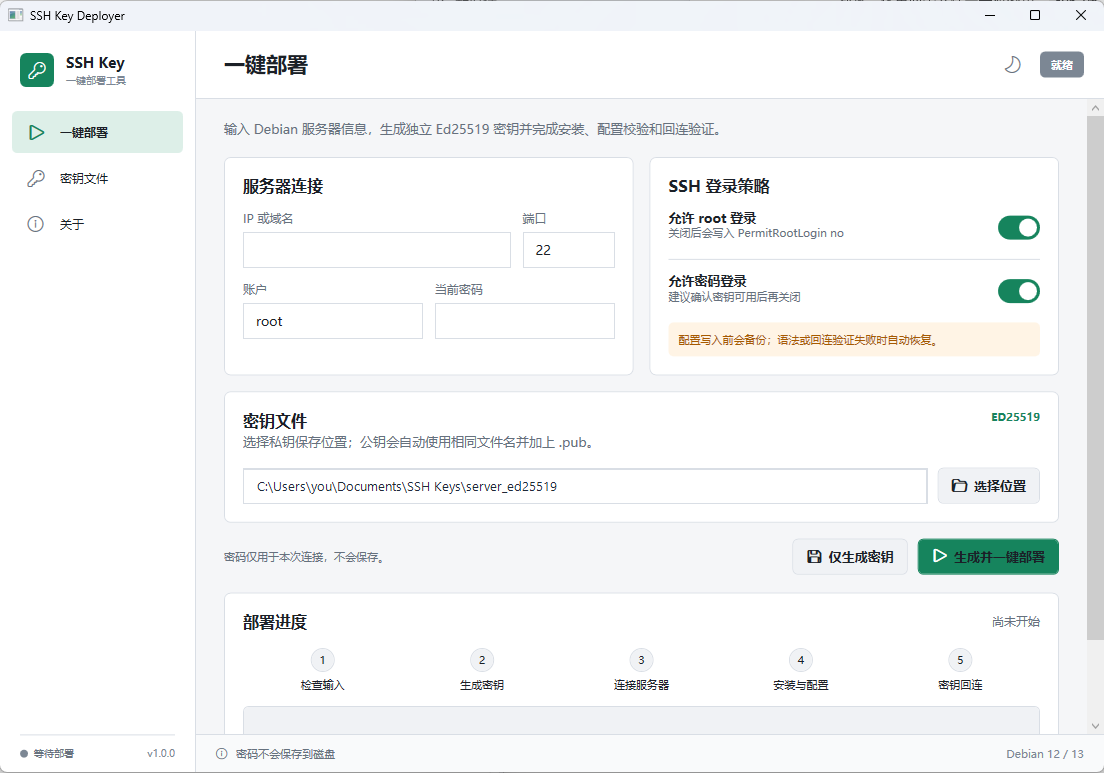
I wanted the interface to feel less like a wizard that hides everything behind a Next button and more like a compact control panel. The connection fields are visible. The root-login and password-login choices are explicit toggles. The key destination is a normal path. The progress area shows the stages from input checks through key generation, connection, installation, configuration, and key verification.
That is also why the app has a separate key-files page. After a deployment, the important artifact is not an “operation completed” message. It is the private key and public key pair that the user will need to keep, protect, and use.
The current Windows interface is in Simplified Chinese, while the repository documentation is available in both English and Simplified Chinese. I would rather be clear about that than imply that the UI is already localized when it is not.
What I wanted to leave out
SSH Key Deployer is intentionally opinionated. It targets the Debian 12 and Debian 13 workflow that I needed. It is not trying to become a universal infrastructure manager, a replacement for a shell, or a reason to enable insecure login policies without thinking about the consequences.
It also does not try to take ownership of a server it cannot see. It cannot validate a host fingerprint through a provider account. It cannot make a weak password safe. It cannot know whether another administrator is about to change the same file. Those limits are not missing marketing features. They are the boundaries that keep a small admin tool honest.
The project started because a simple setup task had too many places where a small typo could turn into a locked-out server. I wanted one focused Windows tool that makes the steps visible, verifies the result, and leaves me with ordinary SSH files instead of another opaque system to maintain.
Project: github.com/tuolaji996/windows-ssh-key-deployer
Latest release: SSH Key Deployer releases